Reflow Gateway
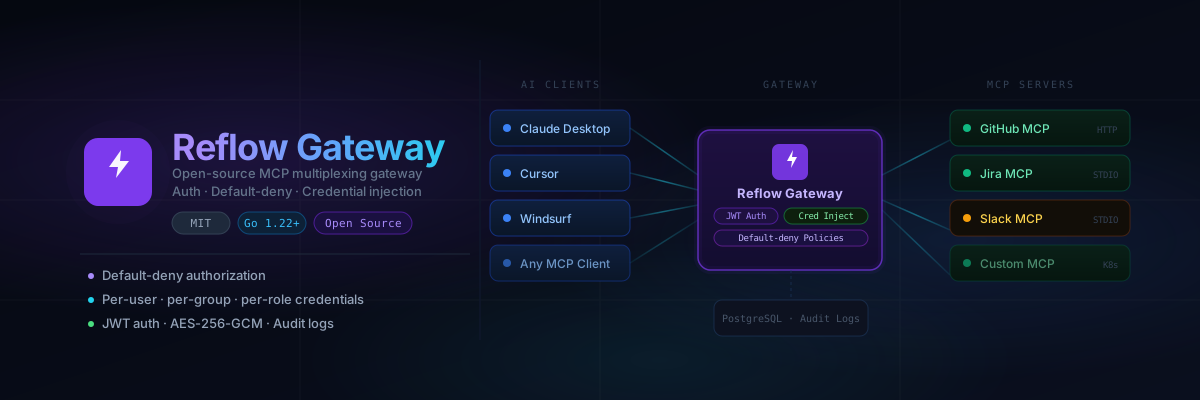
An MCP (Model Context Protocol) multiplexing gateway that sits between AI clients and upstream MCP servers, providing authentication, fine-grained authorization, credential injection, and transport abstraction.
Features
- MCP Multiplexing -- aggregate tools, resources, and prompts from multiple MCP servers into a single endpoint
- JWT Authentication -- secure all MCP requests with JWT tokens
- Default-Deny Authorization -- fine-grained policy engine at target, tool, resource, and prompt level
- Credential Injection -- resolve and inject upstream credentials per user/role/group (never expose to clients)
- Multi-Transport -- Streamable HTTP, SSE, STDIO, and Kubernetes transports
- Process/Pod Lifecycle -- manage STDIO processes and Kubernetes pods with isolation and automatic GC
- Audit Logging -- all requests and authorization decisions are logged
- Observability -- OpenTelemetry tracing, Grafana dashboards, real-time WebSocket dashboard
Quick Start with Docker Compose
Prerequisites
- Docker and Docker Compose
curlandgit
1. Clone and start
git clone https://github.com/JulianPedro/reflow-gateway.git
cd reflow-gateway

cp .env.example .env
# Edit .env with secure secrets (see below)

docker compose up -d
2. Generate secrets
# JWT secret
openssl rand -hex 32

# Encryption key (exactly 32 characters)
openssl rand -base64 24 | cut -c1-32

# Database password
openssl rand -hex 16
Update .env with the generated values:
DB_PASSWORD=<generated>
JWT_SECRET=<generated>
ENCRYPTION_KEY=<generated>
3. Verify
curl http://localhost:3000/health
# {"status":"ok"}
4. Register the first admin user
The first user to register automatically gets the admin role:
curl -X POST http://localhost:3000/api/auth/register \
  -H "Content-Type: application/json" \
  -d '{"email":"admin@example.com","password":"secure123"}'
5. Login and get a token
curl -X POST http://localhost:3000/api/auth/login \
  -H "Content-Type: application/json" \
  -d '{"email":"admin@example.com","password":"secure123"}'
Services
| Service | URL | Description |
|---|---|---|
| Gateway API | http://localhost:3000 | Backend API + MCP endpoint |
| API Docs | http://localhost:3000/docs | Scalar API reference UI |
| Grafana | http://localhost:3002 | Observability dashboards (admin/admin) |
Quick Start with install.sh
For a fully automated setup:
curl -fsSL https://raw.githubusercontent.com/JulianPedro/reflow-gateway/main/install.sh | bash
This will clone the repo, generate secrets, start Docker Compose, and wait for the health check.
Local Development
Backend
cd backend
go mod download

# Start only PostgreSQL
docker compose up -d postgres

export DB_PASSWORD=reflow_dev_password
export JWT_SECRET=your-dev-secret-key-at-least-32-chars
export ENCRYPTION_KEY=12345678901234567890123456789012

go run cmd/server/main.go -config ../config.yaml
Frontend
cd frontend
npm install
npm run dev
Next Steps
- Architecture -- understand the system design
- Configuration -- reference for all config options
- Authentication -- JWT, API tokens, user management
- Authorization -- policies, default-deny model
- Transports -- Streamable HTTP, SSE, STDIO, Kubernetes